
Applications & intake
Manage applications from first contact to move-in.
Build custom intake forms and chart fields for the information your program needs. Add Diamond’s Application Manager to collect online applications and organize your waitlist.Customize intake forms and resident chart fields. Use Diamond’s Application Manager for applications and waitlists.
Try Professional intake forms free for 30 days. Application Manager requires a paid Diamond subscription.
What you can do
A clear process for prospective residents.
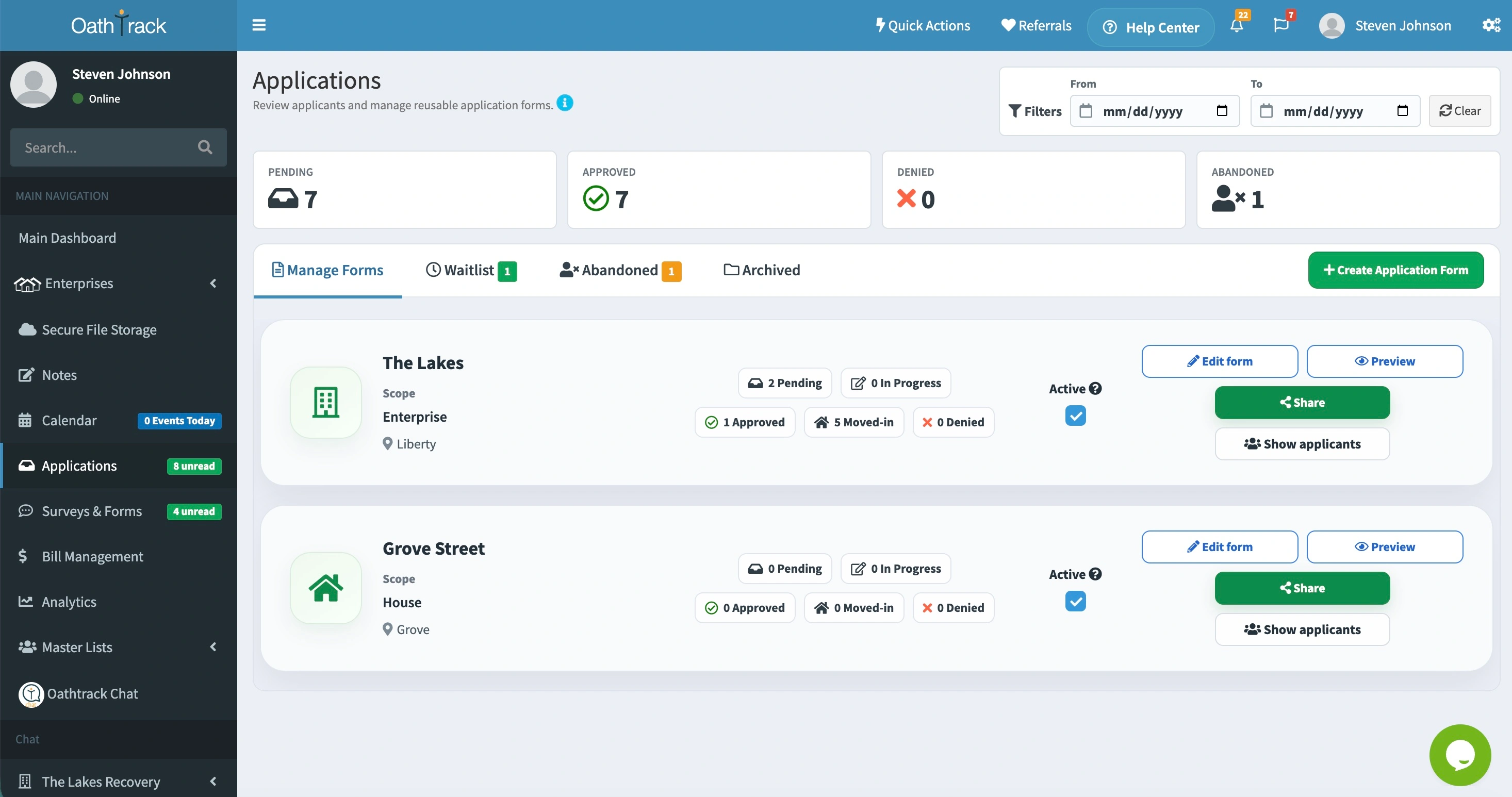
Accept applications online
Create an application form and share its public link on your website so prospective residents can apply.
Manage your waitlist
Review each submission and add applicants to your waitlist when a place is not yet available.
Prepare the resident record
Convert an approved application into a resident chart. Use custom intake fields to collect additional information before move-in.
- Build custom intake forms and chart fields with Professional or Diamond.
- Collect online applications and manage your waitlist with Diamond.
- Prepare resident records with the details your program needs.
Forms that fit your program
Collect the information your team actually needs.
Use the custom form builder to shape intake around your program. Add custom chart fields to keep those details available in the resident record as your team’s work continues.
Compare form-building options- Create custom intake forms for your program’s questions.
- Add chart fields for the details your staff need to track.
- Keep program-specific information with the resident record.
Custom intake forms and chart fields are included with Professional and Diamond. The Application Manager is included with Diamond.
How it works
Turn an approved application into a resident chart.
Build your form on the Applications page and share its link. Review submissions as they arrive, then approve an applicant or add them to the waitlist. When you are ready, convert the approved application into a resident chart.
View setup instructions
Build your form on the Applications page and share its link. Review submissions as they arrive, then approve an applicant or add them to the waitlist. When you are ready, convert the approved application into a resident chart.
- Create an application form and share its link.
- Review submissions and manage your waitlist.
- Approve the applicant and create their resident chart.
Before you get started
Plans & common questions.
Diamond includes the Application Manager. Custom intake forms and chart fields are included with Professional and Diamond.
Compare plansWhich plan includes the custom form builder?
Professional and Diamond include custom intake forms and custom chart fields. Diamond also includes the Application Manager for online residency applications and waitlists.
How are applications different from intake forms?
Applications let prospective residents apply through a public link. Intake forms collect the information you need to create a resident record and can be completed by staff or emailed to the incoming resident.
How are applications different from surveys?
Applications support public online submissions to apply for residency. Custom surveys and forms are sent to specific recipients by email.
Do applicants move to the waitlist automatically?
No. When reviewing an application, choose Add to Waitlist to place the applicant on your waitlist.
Ready to get started?
Build an intake process that fits your program.
Explore custom intake forms with Professional, or book a demo of Diamond’s Application Manager.
Try Professional intake forms free for 30 days. Application Manager requires a paid Diamond subscription.